
Your MacBook used to last all day on a single charge, but now it barely makes it through the morning. You charge it overnight, and by afternoon it shows a low battery warning. Your MacBook shuts down unexpectedly despite showing adequate battery percentage. These are telltale signs that your MacBook battery needs replacement. Understanding battery problems and knowing when professional service is necessary helps you restore your MacBook to full working condition.
At TechFix.ae, we replace MacBook batteries regularly. We understand how frustrating battery degradation is, especially for professionals who depend on their MacBook for work and mobility. In this comprehensive guide, we will explain MacBook battery problems, why batteries degrade, when replacement is needed, and what to expect from professional battery replacement service.
How MacBook Batteries Work
MacBook batteries are lithium polymer batteries designed to provide extended battery life while remaining compact enough to fit inside your slim device. These batteries store electrical energy that powers your MacBook when not connected to external power.
Every time you charge and discharge your MacBook battery, it undergoes one charge cycle. Through chemistry and physics, each charge cycle reduces the battery's capacity slightly. After hundreds or thousands of charge cycles, batteries eventually degrade to the point where they no longer hold meaningful charge.
Apple designs MacBooks to work optimally for approximately three to five years of typical use. Battery degradation is natural and inevitable. Understanding this helps you accept that battery replacement is a normal part of MacBook ownership rather than a sign of device failure.
Common Signs Your MacBook Battery Needs Replacement
Recognizing battery problems early helps you avoid unexpected shutdowns and plan for replacement at a convenient time.
Your battery drains unusually fast. If your MacBook battery used to last all day on a single charge but now barely lasts a few hours, your battery has degraded. Compare your battery runtime to when your MacBook was new. If the difference is dramatic, battery replacement is likely needed soon.
Your MacBook shuts down unexpectedly even when the battery percentage shows 20 percent or higher. Modern MacBooks shut down automatically when the battery truly depletes, but a degraded battery might shut down at much higher percentage levels. This happens because the battery can no longer reliably report its actual charge level or deliver sufficient power.
Your MacBook runs slowly when using battery power. When your battery is degraded, MacOS automatically reduces processor speed to conserve power. This throttling causes noticeable performance reduction. Your MacBook might feel sluggish during everyday tasks like web browsing or document editing.
Your MacBook gets extremely hot during normal use. A degraded battery works harder to deliver needed power, generating excess heat. If your MacBook consistently runs hot even during light tasks, battery problems might be the cause of excessive temperature.
Your MacBook takes much longer to charge than it used to. A failing battery might require charging overnight or longer even when using a quality charger. Extended charging times indicate battery degradation or possible charger problems.
The battery percentage jumps erratically. If your battery percentage jumps from 30 percent to 15 percent to 40 percent without logical progression, the battery is failing. This erratic behavior indicates the battery can no longer accurately report its charge level.
You see a service battery warning in MacOS. If your system shows a yellow warning icon or message saying your battery needs service, Apple's diagnostic tools have detected battery problems. This is a clear signal that replacement is needed soon.
Your MacBook battery feels warm or hot even when the device is not in use. A battery that generates excessive heat even when idle is likely failing. Heat is a sign that the battery is struggling internally.
The battery does not charge past a certain percentage. Some degraded batteries stop charging at 80 percent despite being plugged in overnight. This is a protection mechanism to extend battery life temporarily, but it signals replacement is necessary.
Why Battery Degradation Happens
Understanding why batteries degrade helps you accept that replacement is normal and not a manufacturing defect.
Chemical reactions inside the battery enable energy storage and discharge. Over time, these chemical processes create permanent changes in the battery that reduce its capacity. This is inevitable chemistry, not a design flaw in modern MacBooks.
Heat accelerates battery degradation significantly. Using your MacBook in hot environments, running demanding applications, or using your MacBook while charging generates internal heat. Heat speeds up the chemical degradation process considerably.
Battery age alone causes degradation. Even if you rarely use your MacBook, the battery degrades simply because time passes. After three to five years, even a rarely used battery has degraded significantly.
Charge cycles degrade the battery. Each time you discharge and recharge your battery, it undergoes one charge cycle. Frequent charging accelerates degradation. Heavy users who fully discharge and recharge their MacBook multiple times daily degrade their batteries faster than light users.
Leaving your MacBook plugged in constantly causes some degradation. Some studies suggest that MacBooks left plugged in 24/7 degrade slightly faster than MacBooks that alternate between battery and plugged operation.
Storage conditions affect battery health. MacBooks stored in very hot or very cold environments experience faster degradation. Proper storage conditions help preserve battery health longer and extend the overall lifespan.
What to Expect from Professional MacBook Battery Replacement
When you bring your MacBook to a professional repair shop for battery replacement, understanding the process helps you feel confident about the service.
Technicians first diagnose your battery using specialized diagnostic software and equipment. They verify that the battery is actually failing and not another component causing the problem. They check for charging port issues, charger problems, and logic board issues that might mimic battery problems.
Once battery failure is confirmed, technicians explain the situation to you clearly. They discuss replacement options and realistic timeline for the service. Professional shops let you approve the replacement before work begins.
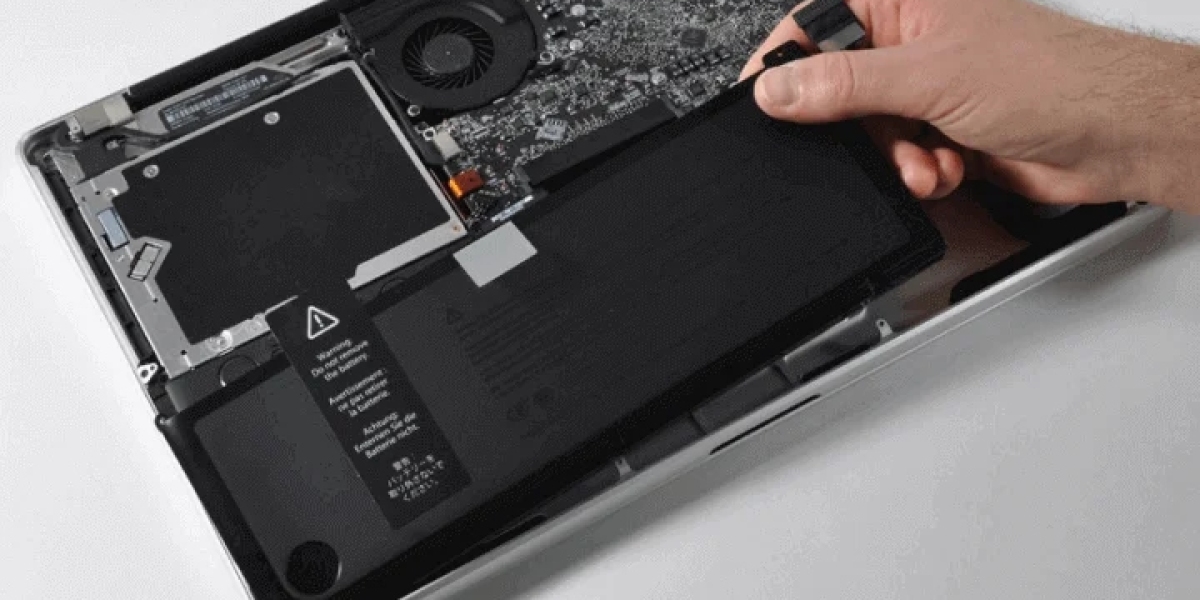
Technicians carefully open your MacBook and access the battery. Different MacBook models have different battery access points. Some batteries are easily accessible while others require partial disassembly of the device to reach.
The old battery is disconnected from the logic board and removed carefully. Technicians take precautions to ensure the battery is handled safely and disposed of properly. Old batteries should never go in regular trash as they contain hazardous materials.
A new battery matching your specific MacBook model is installed. Professional shops use genuine Apple batteries or certified aftermarket batteries that meet Apple's specifications. Quality batteries ensure your MacBook functions optimally for years to come.
The new battery is connected to the logic board and tested thoroughly. Technicians ensure the battery is properly recognized by MacOS and charges correctly. They verify all connections are secure.
Your MacBook is run through a complete test. The new battery is charged to full capacity, then discharged during actual use to verify it performs as expected. Technicians verify battery health readings are normal and the installation was successful.
Before returning your MacBook, technicians clean the device and ensure everything is reassembled properly. Your MacBook is returned in excellent condition with the new battery working perfectly.
Professional shops provide information about your new battery and how to maintain it for optimal longevity. They offer warranty coverage on both the battery and the installation labor.
How to Extend MacBook Battery Life
While battery replacement is inevitable, you can extend your battery's life significantly through proper usage habits and care.
Avoid letting your battery fully deplete regularly. Try to recharge before your battery drops below 20 percent. This reduces stress on the battery considerably.
Avoid charging your battery to 100 percent constantly. Modern MacBook batteries benefit from charging to around 80 percent for daily use and reserving full charges for when you need maximum battery runtime.
Keep your MacBook cool during use. Avoid using your MacBook in hot environments. Make sure ventilation ports are not blocked. Heat accelerates battery degradation significantly.
Avoid leaving your MacBook plugged in for days or weeks at a time. If you are not using your MacBook for extended periods, unplug it and store it in a cool location to preserve battery health.
Use energy saving settings in MacOS. Enabling reduced processor speed in battery preferences reduces power consumption and reduces strain on your battery during everyday use.
Close unnecessary background applications. Applications running in the background consume power constantly. Close apps you are not actively using to reduce battery strain.
Reduce screen brightness when possible. Your display uses significant power. Lower brightness reduces battery consumption.
Turn off location services when not needed. Location services use significant power constantly.
Disable automatic app updates. Set updates to manual instead of automatic to reduce background power consumption.
Minimize push notifications. Each notification uses power. Disable notifications for apps that do not require them.
The Cost of Ignoring Battery Problems
Ignoring MacBook battery issues creates several problems. Do not ignore battery problems hoping they resolve themselves.
Unexpected shutdowns can cause data loss or corruption. You might lose unsaved work when your MacBook shuts down suddenly. Important documents might be corrupted. Data might become temporarily inaccessible.
A failing battery sometimes causes damage to other components. Heat from a struggling battery can damage the logic board. Battery swelling can cause physical damage to your MacBook frame. Professional battery replacement prevents these secondary problems.
A degraded battery reduces your MacBook's mobility and usefulness. You cannot work away from power sources. Your MacBook becomes tethered to charging outlets.
When to Replace Your MacBook Battery
You should replace your MacBook battery as soon as you notice significant performance decline. Waiting too long increases the risk of unexpected shutdowns and potential damage to other components.
If your MacBook is more than three years old and you notice battery problems, replacement is likely needed. If your MacBook is still under warranty and showing battery problems, contact Apple or an authorized macbook battery replacement dubai service about warranty service.
Why Professional Battery Replacement Matters
Attempting MacBook battery replacement yourself is extremely difficult and dangerous. MacBook batteries are glued in place and difficult to remove. Trying to pry them out risks damaging the logic board or creating fire hazards.
Professional tools and expertise are necessary for safe battery removal and installation. Professional shops have invested in proper tools and training. They complete battery replacements quickly and correctly, minimizing risk to your MacBook.
Professional shops provide quality batteries with warranties. If problems develop after replacement, they will address them without additional charges.
Finding Professional MacBook Battery Replacement Service
When you need macbook battery replacement dubai service, look for shops with extensive experience with your specific MacBook model. Different models have different battery types and access points.
Choose shops that use genuine Apple batteries or certified quality replacements. Quality batteries ensure optimal performance. Cheap batteries often fail quickly and require replacement again within months.
Look for shops offering warranties on their battery replacement work. Reputable shops stand behind their work with guarantees.
Check customer reviews and ask for references. What do other MacBook owners say about the shop's battery replacement service?
Final Thoughts
MacBook battery degradation is inevitable, but professional replacement restores your device to full battery capacity and performance. When you notice your battery needs service, contact a professional MacBook battery replacement service and schedule service.
Professional battery replacement ensures your MacBook receives a quality genuine or certified battery and expert installation. Your MacBook will perform like new after battery replacement with all day battery life restored.
Get your MacBook battery replaced today by professional technicians and restore your device to full productivity and mobility.